
Sona - Music Player
MerlisMusic & Audio
4.7176.00 Reviews
- Version
- 1.3.4
- Installs
- 500.00K
- Age Rating
- Everyone
Screenshots
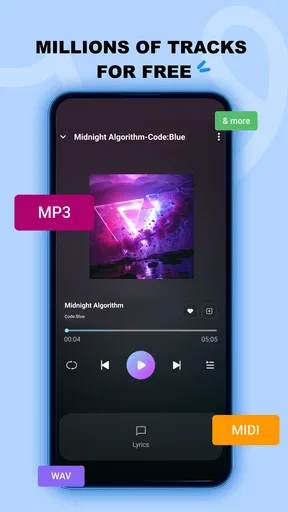
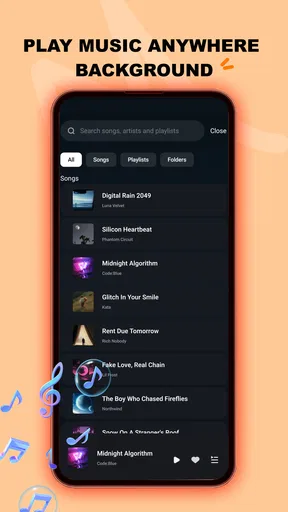
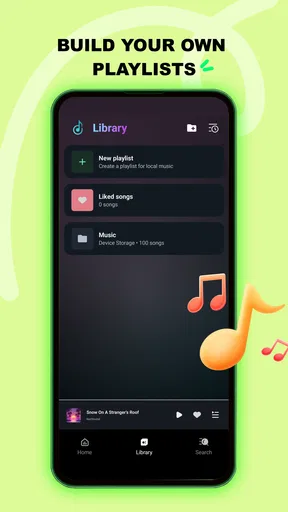
Our Review of Sona - Music Player
 Analysis by Appyee
I tried Sona - Music Player as the kind of app that can quietly become part of a shared device: one phone passed around the house, a tablet used in the kitchen, or an older Android handset kept for music. Its appeal is easy to understand. It is a free music and audio app from Merlis, rated for Everyone, and its purpose is straightforward rather than overloaded with social features or account-heavy distractions.
That simplicity is also the main question behind the app: does it work well when several people use the same device, or is it better treated as one person’s private player? In my experience, Sona is most interesting when you want quick access to music without turning playback into another service to manage. It feels like a practical choice for casual listening, but shared use requires a little thought because the listening experience belongs to the device more than to separate household profiles.
How Sona feels on a shared household device
A realistic example is a family tablet sitting in the living room. One person uses it for background music while cooking, another picks it up for a playlist during homework, and someone else later wants a different listening session. A lightweight player can be more convenient here than an account-based streaming service, especially when nobody wants to sign in and out or connect a personal profile to a common screen.
Sona fits that situation because its identity is centered on playing music, not on building a public profile. I found that appealing for a shared device. The app does not need to feel like a social destination before it can be useful, and that makes it easier to hand the device to another person without explaining a complicated service structure.
There is an important trade-off, though. A shared player does not automatically understand who is listening. If one person changes the current track, queue, or playback position, the next person may inherit that state. That is not a flaw unique to this app; it is the natural consequence of using one music player on one device. Still, it means Sona works best when household members accept that playback is communal, or when each person takes a moment to reset the listening session before starting.
I would not treat it as a replacement for separate music accounts when everyone expects individualized recommendations, private libraries, or a personal history. Those services are better at separating identities. Sona makes more sense when the priority is immediate playback and a low-friction experience on a device that people already share.
What the first setup tells you
The first useful decision is not about sound quality or playlists; it is about ownership. Before putting Sona on a common phone or tablet, I would decide whether that device is the music source for everyone or whether it belongs mainly to one listener. That distinction affects how carefully you organize the library and how much inconvenience you will tolerate when another person uses it.
For a personal device, the app can remain simple: install it, open it when you want music, and arrange your listening around the content already available on that device. For a shared device, I would begin with a small, clearly organized collection rather than importing every piece of audio at once. A crowded library makes handoffs harder, while a focused collection lets different members find something quickly.
This is one of the less obvious strengths of a basic player. You can shape the device around the household’s actual routine instead of accepting the recommendations and menus of a larger platform. The limitation is that this flexibility depends on your own organization. Sona cannot decide which songs belong together for each person unless the device and its library have already been arranged sensibly.
Another practical boundary is the operating system. Sona supports Android from version 8.0 onward, which makes it suitable for many older devices that are no longer ideal candidates for the newest apps. That can be useful in a household: an unused phone may become a dedicated music device rather than a source of notifications and unrelated accounts. I would still check the device’s general condition before relying on it, because an old battery, weak speaker, or limited storage can affect the experience more than the player itself.
The current release is version 1.3.4. I would keep the app updated through the normal device tools, particularly on a shared handset that may be handled by people with different levels of technical confidence. Keeping one known version across household devices also makes it easier to explain where controls are and reduces confusion when someone expects the interface to behave differently.
Boundaries matter more than extra features
When several people use one device, I prefer to establish a few simple rules before calling the setup successful. Decide who can add or remove music, whether the queue is temporary or intended for everyone, and whether the device stays in one room or travels around the house. These are not Sona-specific settings that I am claiming the app provides; they are habits that prevent a shared player from becoming disorganized.
I would also avoid treating a common device as a private account substitute. If a teenager, parent, or guest uses the same phone, the app should not be assumed to separate their listening automatically. The cleanest approach is to think of the device as a shared shelf: anything placed there may be seen or played by the next person. That expectation is especially important when the household includes people with different music tastes or different ideas about what belongs in a common collection.
For an individual listener, this is less of a concern. Sona can be a more direct alternative to a large streaming app when you do not want recommendations, social discovery, or a subscription decision to stand between you and playback. For a family, the same directness becomes a coordination issue. The app stays easy; the household routine has to provide the missing separation.
Coordinating music without turning it into a project
I found the best shared-device workflow is to separate “music for everyone” from “music for one person.” Keep the common device focused on material that is suitable for the room, then let personal listening happen elsewhere when privacy or individual organization matters. This avoids constant rearranging and gives the shared player a clear purpose.
A useful routine is to leave the device in a neutral state after listening. Stop playback, return to a predictable place in the library, and put the device back where the next person expects to find it. That sounds minor, but it removes the small moments of friction that make shared technology feel unreliable. If somebody opens the app and immediately sees an unfamiliar queue or a half-finished track, they may assume the player is confusing when the real problem is simply an unclear handoff.
For gatherings, I would assign one person to manage music rather than letting several people change playback at the same time. This is not about restricting the app; it is about preserving a coherent flow. A basic player is often most enjoyable when one listener has responsibility for the current session, while everyone else makes suggestions verbally or waits for a natural transition.
There is also a useful distinction between background music and focused listening. Sona suits background use on a kitchen or living-room device because the device can remain dedicated to audio. For focused listening, such as a long session with headphones, I would use a personal device instead. That keeps the shared queue intact and prevents someone else from discovering that their household music setup has been unexpectedly changed.
My advice is to test the handoff before committing to the arrangement. Have two people use the same device at different times, then see whether the second person can find what they want without asking for help. If the answer is no, improve the library organization or the household routine before blaming the app. This test reveals more about whether Sona fits your home than a quick solo session does.
Age context and trust on a common device
Sona carries an Everyone content rating, which makes its general positioning comfortable for a broad household audience. I would still separate that rating from the question of what the device contains. A music player can be suitable for general use while the audio collection itself reflects the choices of the people who added it.
That is why I would not hand a child a shared music device with the assumption that the age label creates a complete household boundary. The rating describes the app’s intended content context, not a custom family arrangement for every library or listening situation. Parents and guardians should decide what belongs on the device and whether younger listeners use it independently or with an adult nearby.
This is also where trust becomes more useful than complicated rules. If the device is kept in a common area and the library is curated together, Sona can work well as a family music player. If a child needs a tightly controlled, individualized environment, I would choose a service or device designed specifically around those controls rather than expecting a straightforward player to provide them.
The same principle applies to guests. Because Sona is free and aimed at broad everyday use, it is easy to imagine installing it on a spare phone for visitors or a temporary household setup. But I would avoid loading personal material onto a device that regularly leaves the house. Shared convenience should not be confused with privacy, and the simplest way to protect personal listening is to keep personal collections on personal devices.
Where it beats the usual alternatives
Compared with a major streaming app, Sona’s strongest advantage is focus. Large services are excellent when you want discovery, synchronized accounts, recommendations, and access to an enormous catalog. They are also more demanding: you may need to manage profiles, subscriptions, connectivity expectations, and personalized settings. Sona is a better fit when you want the music player itself to stay out of the way.
Compared with a more advanced local audio tool, Sona may appeal to people who do not want to spend time fine-tuning every part of playback. Enthusiast-oriented players can offer deeper organization and more controls, but that extra depth can slow down a shared-device user who simply wants to start listening. I would choose Sona for the household tablet that needs to be understandable at a glance, and a specialist player for a listener who cares about detailed library management.
Compared with using a web browser for music, a dedicated app feels more appropriate for a device whose main job is audio. You are not mixing the listening session with open tabs, search pages, or unrelated browsing. That separation is particularly helpful in a shared room, where the tablet can remain an audio appliance rather than becoming somebody’s general-purpose browsing screen.
The compromise is that Sona should not be judged as though it were a full streaming ecosystem. If your decision depends on personalized recommendations, collaborative account features, or a large online catalog, the usual alternatives will probably serve you better. Its value is in reducing complexity, not in competing with every capability those platforms provide.
Everyday situations where I would use it
I would use Sona on an older Android phone connected to a small speaker in a workspace. The phone could remain on a shelf, with the app serving one clear purpose instead of competing with messages and calls on my main device. That arrangement also reduces the temptation to interrupt music every time a notification appears elsewhere.
I would also consider it for a shared tablet during a family meal or a quiet afternoon at home. One person can start the session, another can take over later, and the device remains easy to understand as long as everyone accepts that the playback state is shared. The app’s free price makes this kind of secondary-device use easier to justify than paying for another dedicated service simply to play audio in one room.
For travel, I would be more selective. A spare device with a prepared music collection can be useful when several people want background audio, but I would not rely on a shared arrangement if each traveler expects a separate queue or private listening history. In that situation, individual phones and headphones create fewer arguments and less resetting.
I would skip Sona as my main choice if music discovery is the reason I listen. Someone who enjoys daily recommendations, algorithmic mixes, or a carefully maintained personal profile will likely feel that a focused player leaves too much work outside the app. I would also skip it for a household where nobody wants to coordinate a common library. The app is simple enough to use, but simplicity does not remove the need to decide what the shared device is for.
Performance expectations and practical patience
The app’s broad compatibility is useful, but an Android device meeting the minimum operating-system requirement is not automatically a perfect music machine. Older hardware may have a tired battery, inconsistent Bluetooth behavior, or limited space for audio. Before concluding that Sona is at fault, I would test the phone’s speaker, headphones, and connection separately. This is a practical step that saves time, especially when repurposing a device from a drawer.
I would also keep the shared device’s role narrow. The more tasks it performs at once, the more likely it is that another household member changes something unrelated to playback. A dedicated music routine gives Sona a fairer test and makes the experience feel more dependable. In my view, the app benefits from being treated as part of a simple setup rather than as one application among dozens competing for attention.
The public response is encouraging: Sona holds a 4.7 average from around 9.2 thousand ratings, with more than 500 thousand installs. Those figures suggest that the straightforward approach resonates with a substantial audience, although they do not remove the need to check whether your own household expects features beyond basic music playback. I read that reception as a reason to try the app, not as a guarantee that it will replace a full music ecosystem for everyone.
My household verdict
After looking at Sona through the shared-device lens, I see it as a sensible choice for a home that wants music to be accessible without adding another complicated account system. Merlis has kept the concept easy to understand, and the free model makes it practical for a spare Android device, a common tablet, or a simple room-based listening setup.
The key is to share the device deliberately, not accidentally. If one household member owns the library and everyone else is expected to browse it, establish that clearly. If the device is communal, keep the collection communal and accept that playback state belongs to whoever used it last. Those small decisions make a bigger difference than searching for hidden complexity inside the player.
I would recommend Sona to casual listeners, households with a common music device, and people who prefer a focused audio tool over a large streaming platform. I would be less enthusiastic for families that need separate identities, detailed supervision, or personalized discovery, because those needs are better handled by alternatives built around accounts and profiles.
Overall, Sona succeeds when its limits are treated as part of its purpose. It is not trying to be the social center of your music life. It is a free Music & Audio app for getting a listening session going with minimal fuss, and on a shared device that can be exactly what a household wants—as long as everyone understands where personal boundaries end and communal playback begins.
Verdict
Strengths of Sona - Music Player
- Clean, distraction-free interface for browsing and playing music.
- Supports offline playback for listening without a data connection.
- Quick search makes finding artists, albums, and tracks simple.
- Playback controls remain easy to access while browsing the library.
- Lightweight design helps it run smoothly on many Android devices.
Limitations of Sona - Music Player
- Some advanced audio features may require a paid upgrade.
- Initial library scanning can take time with large music collections.
- Limited streaming integration compared with larger music platforms.
- Album artwork and metadata may need manual correction for some files.
- Feature availability can vary between Android and iOS versions.
Similar Picks in This Category
View All
YouTube Music
Google LLC4.4

Samsung Music
Samsung Electronics Co., Ltd.3.8

Spotify: Music and Podcasts
Spotify AB4.3

JioSaavn - Music & Podcasts
Saavn Media Limited4.3

Lark Player:Music Player & MP3
Lark Player Studio - Music, MP3 & Video Player4.6

StarMaker: Sing Karaoke Songs
SKYWORK AI PTE. LTD.4.3
Frequently Asked Questions
What is Sona - Music Player, and what type of music can it play?
Sona - Music Player is designed for listening to music stored on your device, making it useful for users who prefer managing a personal offline collection rather than relying entirely on streaming services. Before downloading, check which audio formats it supports and whether your songs are saved locally in a compatible folder. It generally does not provide access to commercial streaming catalogs by itself.
Does Sona - Music Player require an internet connection?
The basic listening experience is intended to work offline when your music files are already stored on your Android or iOS device. An internet connection may still be needed for downloading the app, receiving updates, displaying advertisements, or using optional online functions, depending on the version available in your region. Offline playback is especially convenient for travel and areas with limited connectivity.
Can I organize playlists and manage my music library in Sona?
Sona - Music Player is most useful when it offers practical library-management tools such as playlists, albums, artists, favorites, search, and playback history. The exact options can vary by platform and app release, so users should review the current store description before installing. If you maintain a large collection, confirm that the player scans folders accurately and lets you edit or sort tracks easily.
Does Sona - Music Player support background playback and common audio controls?
Before downloading, users should confirm that Sona supports background playback, lock-screen controls, notification controls, repeat, shuffle, and reliable resume after interruptions. These features are important for listening while using other apps or when the screen is turned off. Compatibility can differ between Android and iOS because each operating system handles audio playback, permissions, and background activity differently.
Is Sona - Music Player free, and are there advertisements or in-app purchases?
The price and monetization model may depend on the platform and the version listed in your local app store. Some releases of music players are free with advertising, while others may include optional purchases for removing ads or unlocking extra features. Check the store page for subscription details, permissions, privacy information, and recent user reviews before installing, particularly if you want a completely free experience.
